Microsoft Clarity integration
TBD...
Microsoft Clarity
Microsoft Clarity is an analytics tool that helps you understand how users interact with your website through session recordings and heatmaps.
The conditions of processing and storage of data related to the Clarity tag (deposited by AB Tasty upon activation of this integration) are governed by Clarity’s general terms and conditions of use (visible upon creation of the Clarity account).The Microsoft Clarity integration page lets you link your campaign’s data to Clarity to use Clarity’s Insights, including Session recordings and Heatmaps. These insights enable you to understand the users’ behavior on your website.
Configuration
To be able to link your campaign data to Clarity, you must have or create a Clarity account.
Please ask your KAM or CSM to activate the integration between Delivr and Clarity.
Access Microsoft clarity section
Login to Delivr, navigate to the Delivr click the picto from top-right corner of your screen.
Then choose Integrations and select My connections for choosing created connectors or Catalog for creating new connector
Enter your Clarity Project ID, which is available in the Clarity URL page. It includes numbers and letters following the https://clarity.microsoft.com/projects/view string.
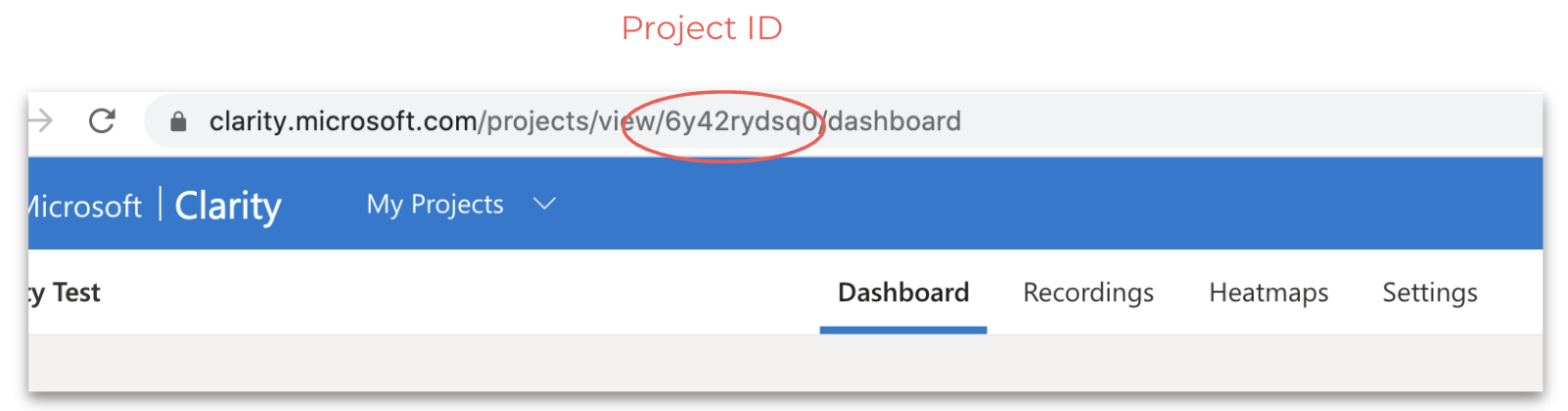
Click Save.
Clarity JavaScript code and the corresponding Project ID are added to the AB Tasty tag. This will automatically send campaign information (campaign ID, variation ID and visitor ID) to your Clarity account.
Was this helpful?